![[ANSYS, Inc. Logo]](fluentlogo.gif)


|
|
|
The Solid Oxide Fuel Cell (SOFC) With Unresolved Electrolyte Model is loaded into ANSYS FLUENT through the text user interface (TUI). The module can only be loaded after a valid ANSYS FLUENT mesh or case file has been set or read. The text command to load the addon module is
define
 models
 addon-module
A list of ANSYS FLUENT addon modules is displayed:
FLUENT Addon Modules: 1. MHD Model 2. Fiber Model 3. Fuel Cell and Electrolysis Model 4. SOFC Model (Unresolved Electrolyte) 5. Population Balance Model Enter Module Number: [1] 4 |
Select the SOFC With Unresolved Electrolyte Model by entering the module number 4. During the loading process, a scheme library (containing the graphical and text user interface) and a UDF library (containing a set of user defined functions) are loaded into ANSYS FLUENT.
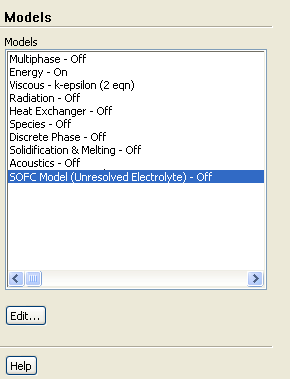
Once the module has been loaded, to open the SOFC Model dialog, select Models under Problem Setup in the navigation pane to display the Models task page. In the Models task page, select the SOFC Model (Unresolved Electrolyte) option in the Models list and click the Edit... button.
 Models

 SOFC Model (Unresolved Electrolyte)
 Edit...
When the SOFC Model dialog appears, select the Enable SOFC Model option.
Previous:
4.1 Installing the Solid