![[ANSYS, Inc. Logo]](fluentlogo.gif)


|
|
|
As mentioned in Section 26.12.1, it is possible to have the size of the time step change as the calculation proceeds, rather than specifying a fixed size for the entire calculation. This section provides a brief description of the algorithm that ANSYS FLUENT uses to compute the time step size, as well as an explanation of each of the parameters that you can set to control the adaptive time stepping.
|
|
Adaptive time stepping is available only with the pressure-based and density-based implicit formulations; it cannot be used with the density-based explicit formulation. In addition, it cannot be used with the discrete phase model, second-order time integration, Euler-Euler multiphase models (
this section in the separate
Theory Guide), or user-defined scalars (Section
9.1).
|
The Adaptive Time Stepping Algorithm
The automatic determination of the time step size is based on the estimation of the truncation error associated with the time integration scheme. If the truncation error is smaller than a specified tolerance, the size of the time step is increased; if the truncation error is greater, the time step size is decreased.
An estimation of the truncation error can be obtained by using a predictor-corrector type of algorithm [ 28] in association with the time integration scheme. At each time step, a predicted solution can be obtained using a computationally inexpensive explicit method (forward Euler for the first-order unsteady formulation, Adams-Bashford for the second-order unsteady formulation). This predicted solution is used as an initial condition for the time step, and the correction is computed using the non-linear iterations associated with the implicit (pressure-based or density-based) formulation. The norm of the difference between the predicted and corrected solutions is used as a measure of the truncation error. By comparing the truncation error with the desired level of accuracy (i.e., the truncation error tolerance), ANSYS FLUENT is able to adjust the time step size by increasing it or decreasing it.
In cases where the truncation error remains above the specified tolerance, ANSYS FLUENT will try to meet the tolerance within 5 attempts. If this tolerance is met, then the iteration moves on to the next time step. An explicit scheme is used to predict the solution at each time step, then the explicit prediction is corrected with an implicit scheme. The truncation error, which is a function of the difference between the predicted and corrected solutions at a specific time is used to calculate the next time step. However, if the calculated truncation error is greater than the tolerance limit, we have the option of reverting from the currently performed iteration, which is moving from the nth step to n+1th step, and performing the iteration with a smaller time step. Note that this option is not available for moving deforming meshes, sliding meshes, and the discrete phase model. Since the truncation error is proportional to the time step, decreasing the time step reduces the truncation error. This can be done until the truncation error goes below the tolerance limit.
Specifying Parameters for Adaptive Time Stepping
The parameters that control the adaptive time stepping appear in the Adaptive Time Step Settings dialog box, as described in Section 26.12.1.
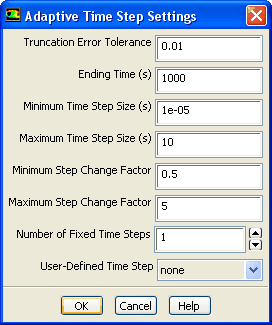 |
These parameters are as follows:
 , is computed as the ratio between the specified truncation error tolerance and the computed truncation error, the size of time step
 is computed as follows:
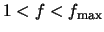 ,
,
 is increased to meet the desired tolerance.
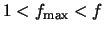 ,
,
 is increased, but its maximum possible value is
 .
.
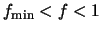 ,
,
 is unchanged.
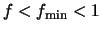 ,
,
 is decreased.
It is a good idea to perform a few fixed-size time steps before switching to the adaptive time stepping. Sometimes spurious discretization errors can be associated with an impulsive start in time. These errors are dissipated during the first few time steps, but they can adversely affect the adaptive time stepping and result in extremely small time steps at the beginning of the calculation.
|
|
When the solution tends to exhibit incomplete convergence, rather than increasing the time step size or keeping the same time step size in the next step,
ANSYS FLUENT reduces the time step size by at least half for the next time step (making sure that the time step size does not go below the specified minimum time step size.
|
Specifying a User-Defined Time Stepping Method
If you want to use your own adaptive time stepping method, instead of the method described above, you can create a user-defined function for your method and select it in the User-Defined Time Step drop-down list. The other inputs in the Adaptive Time Step Settings dialog box will not be used when you select a user-defined function.
See the separate UDF Manual for details about creating and using user-defined functions.
Previous:
26.12.1 User Inputs for

