![[ANSYS, Inc. Logo]](fluentlogo.gif)


|
|
|
In applications that involve the creation, dissolution, or growth of particles (e.g., crystallization), the total volume fraction equation for the particulate phase will have source terms due to these phenomena. The momentum equation for the particulate phase will also have source terms due to the added mass. In ANSYS FLUENT, the mass source term can be specified using the UDF hook DEFINE_HET_RXN_RATE, as described in Appendix A, or using the Phase Interaction dialog box, described below.
As an example, in crystallization, particles are created by means of nucleation (
 ), and a growth rate (
 ) can also be specified. The mass transfer rate of formation (in kg/m
 -s) of particles of all sizes is then
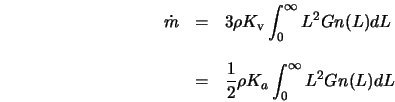 |
(3.3-2) |
For the discrete method, the mass transfer rate due to growth can be written as
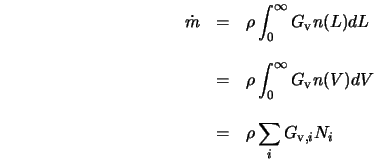 |
(3.3-3) |
If the nucleation rate is included in the total mass transfer, then the mass transfer becomes
 |
(3.3-4) |
|
|
For the discrete method, the sources to the population balance equations must sum to the total mass transfer rate. To access the sources, you can use the macro
C_PB_DISCI_PS (cell, thread, i).
|
See Chapter 5 for more information about macros for population balance variables.
For the SMM, only a size-independent growth rate is available. Hence, the mass transfer rate can be written as
 |
(3.3-5) |
For the QMOM, the mass transfer rate can be written as
 |
(3.3-6) |
For both the SMM and QMOM, mass transfer due to nucleation is negligible, and is not taken into account.
|
|
Note that for crystallization, the primary phase is comprised of multiple components. At the very least, there is a solute and a solvent. To define the multicomponent multiphase system, you will need to activate
Species Transport in the
Species Model dialog box for the primary phase after activating the multiphase model. The rest of the procedure for setting up a species transport problem is identical to setting up species in single phase. The heterogeneous reaction is defined as:

|
When the population balance model is activated, mass transfer between phases for non-reacting species (such as boiling) and heterogeneous reactions (such as crystallization) can be done automatically, in lieu of hooking a UDF.
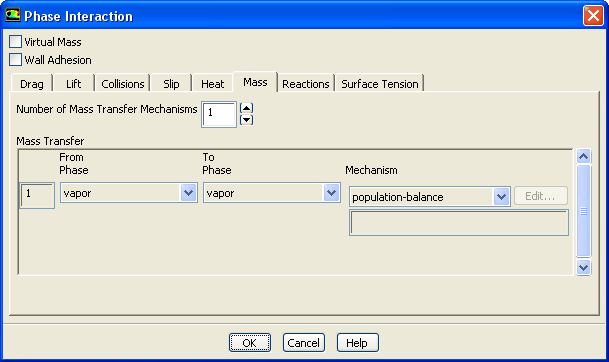
For simple unidirectional mass transfer between primary and secondary phases due to nucleation and growth phenomena of non-reacting species, go to the Phases task page and click the Interaction... button. This will open the Phase Interaction dialog box (Figure 3.3.11). Click the Mass tab to specify the Mass Transfer of species between the phases. Specify the Number of Mass Transfer Mechanisms involved in your case. From the drop-down list under From Phase, select the phase that you want to transfer mass from. In the To Phase drop-down list, select the phase that you want to transfer mass to.
You have a choice of four mechanisms used to transfer mass. Under Mechanism select from the drop-down list
Click OK to save the settings.
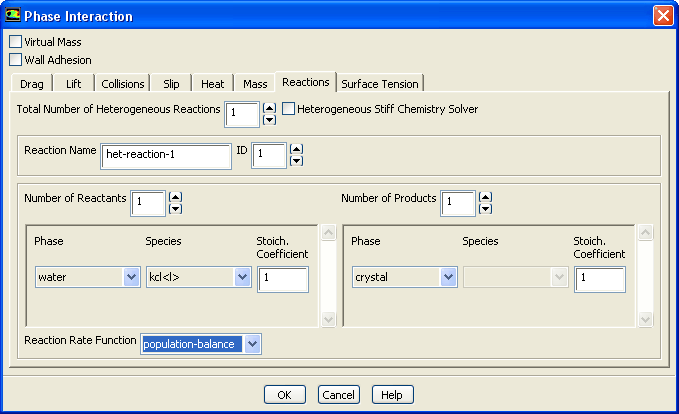
For heterogeneous reactions, the Species Transport model has to be activated for the primary phase. In the Phases task page, click the Interaction... button. This will open the Phase Interaction dialog box (Figure 3.3.12). Click the Reactions tab to specify the stoichiometry for the reactant and the product. At the bottom of the Phase Interaction dialog box, select population-balance as the Reaction Rate Function. Click OK to save the settings. Either this method or the use of the UDF, described in Appendix A, will produce the same results.
Previous:
3.3.4 Coupling With Fluid