[ANSYS, Inc. Logo] return to home search
next up previous contents


Step 4: Materials

figure Materials

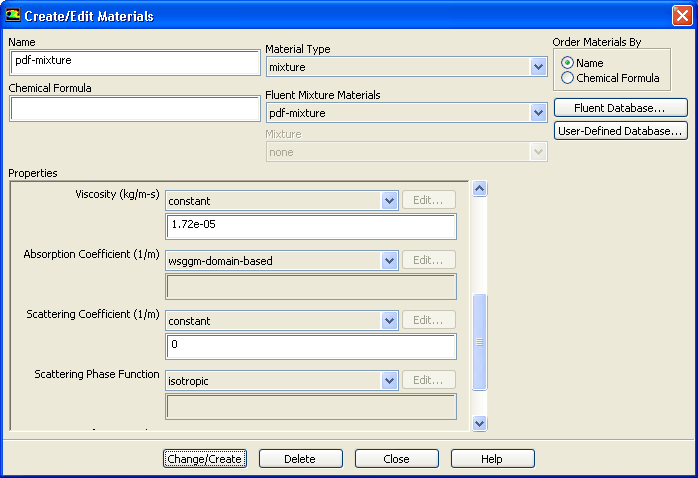
1.   Specify the continuous phase ( pdf-mixture) material.

figure Materials figure figure pdf-mixture figure Create/Edit...

figure

  All thermodynamic data for the continuous phase, including density, specific heat, and formation enthalpies are extracted from the chemical database when the non-premixed combustion model is used. These properties are transferred to the pdf-mixture material, for which only transport properties, such as viscosity and thermal conductivity need to be defined.

(a)   Select wsggm-domain-based from the Absorption Coefficient drop-down list.

Hint:   Scroll down to view the Absorption Coefficient option.

  This specifies a composition-dependent absorption coefficient, using the weighted-sum-of-gray-gases model. WSGGM-domain-based is a variable coefficient that uses a length scale, based on the geometry of the model. Note that WSGGM-cell-based uses a characteristic cell length and can be more mesh dependent.

For more details, see this section in the separate Theory Guide.

(b)   Click Change/Create and close the Create/Edit Materials dialog box.

  You can click the View... button next to Mixture Species to view the species included in the pdf-mixture material. These are the species included during the system chemistry setup. The Density and Cp laws cannot be altered: these properties are stored in the non-premixed combustion look-up tables.

ANSYS FLUENT uses the gas law to compute the mixture density and a mass-weighted mixing law to compute the mixture $C_p$. When the non-premixed combustion model is used, do not alter the properties of the individual species. This will create an inconsistency with the PDF look-up table.


next up previous contents Previous: Step 3: Models
Up: Using the Non-Premixed Combustion
Next: Step 5: Boundary Conditions
Release 12.0 © ANSYS, Inc. 2009-02-09