ANSYS FLUENT can report the overall energy balance and details of the heat and mass transfer.
1.
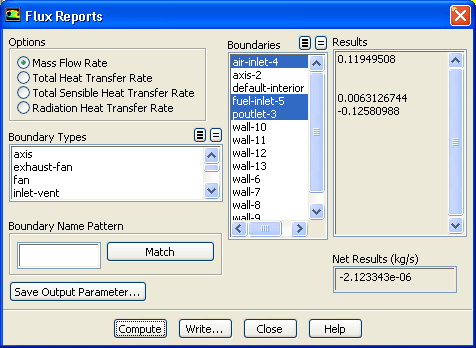
Compute the gas phase mass fluxes through the domain boundaries.
ReportsFluxesSet Up...
(a)
Retain the default Selection of
Mass Flow Rate in the
Options group box.
(b)
Select
air-inlet-4,
fuel-inlet-5, and
poutlet-3 from the
Boundaries selection list.
(c)
Click
Compute.
The net mass imbalance should be a small fraction (say, 0.5% or less) of the total flux through the system. If a significant imbalance occurs, you should decrease your residual tolerances by at least an order of magnitude and continue iterating.
2.
Compute the fluxes of heat through the domain boundaries.
ReportsFluxesSet Up...
(a)
Select
Total Heat Transfer Rate in the
Options group box.
(b)
Select all the zones from the
Boundaries selection list.
(c)
Click
Compute and close the
Flux Reports dialog box.
The value will be displayed in the console. Positive flux reports indicate heat addition to the domain. Negative values indicate heat leaving the domain. Again, the net heat imbalance should be a small fraction (say, 0.5% or less) of the total energy flux through the system. The reported value may change for different runs.
3.
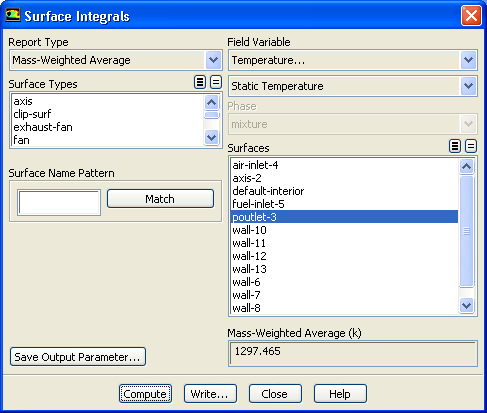
Compute the mass weighted average of the temperature at the pressure outlet.
ReportsSurface IntegralsSet Up...
(a)
Select
Mass-Weighted Average from the
Report Type drop-down list.
(b)
Select
Temperature... and
Static Temperature from the
Field Variable drop-down lists.
(c)
Select
poutlet-3 from the
Surfaces selection list.
(d)
Click
Compute.
A value of 1297.46 K will be displayed in the console.
![[ANSYS, Inc. Logo]](fluentlogo.gif)


 Reports

 Fluxes
 Set Up...
 Reports

 Fluxes
 Set Up...
 Reports

 Surface Integrals
 Set Up...