[ANSYS, Inc. Logo] return to home search
next up previous contents


Step 3: Models

figure Models

  In this problem, the energy equation and the species conservation equations will be solved, along with the momentum and continuity equations.

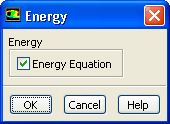
1.   Enable heat transfer by enabling the energy equation.

figure Models figure figure Energy figure Edit...

figure

(a)   Enable Energy Equation.

(b)   Click OK to close the Energy dialog box.

2.   Enable chemical species transport and reaction.

figure Models figure figure Species figure Edit...

  Although you enable reactions, you still run a non-reacting flow to produce an initial solution. You will run reacting flow in step 8.

figure

(a)   Select Species Transport in the Model list.

  The Species Model dialog box will expand to show relevant input options.

(b)   Enable Volumetric and Wall Surface in the Reactions group box.

(c)   Enable Mass Deposition Source in the Wall Surface Reaction Options group box.

   Mass Deposition Source is enabled because there is a certain loss of mass due to the surface deposition reaction, i.e., As(s) and Ga(s) are being deposited out. If you were to do an overall mass balance without taking this fact into account, you would end up with a slight imbalance.

(d)   Enable Inlet Diffusion in the Options group box.

(e)   Retain the default setting for Diffusion Energy Source.

  This includes the effect of enthalpy transport due to species diffusion in the energy equation, which contributes to the energy balance, especially for the case of Lewis numbers far from unity.

(f)   Enable Full Multicomponent Diffusion and Thermal Diffusion.

  The Full Multicomponent Diffusion activates Stefan-Maxwell's equations and computes the diffusive fluxes of all species in the mixture to all concentration gradients. The Thermal Diffusion effects cause heavy molecules to diffuse less rapidly, and light molecules to diffuse more rapidly, toward heated surfaces.

(g)   Click OK to close the Species Model dialog box.

   ANSYS FLUENT will list the properties in the console, that are required for the models that you have enabled.

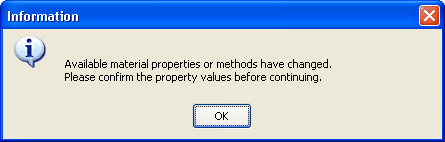
An Information dialog box will open reminding you to confirm the property values that have been extracted from the database.
figure

(h)   Click OK in the Information dialog box.


next up previous contents Previous: Step 2: General Settings
Up: Modeling Surface Chemistry
Next: Step 4: Materials
Release 12.0 © ANSYS, Inc. 2009-02-09