[ANSYS, Inc. Logo] return to home search
next up previous contents

Step 4: Materials

figure Materials

  In this step, you will create the gas-phase species ( $AsH_3$, $Ga(CH_3)_3$, $CH_3$, $H_2$), the site species (Ga_s and As_s), and solid species (Ga and As).

1.   Create species arsine.

figure Materials figure figure air figure Create/Edit...

figure

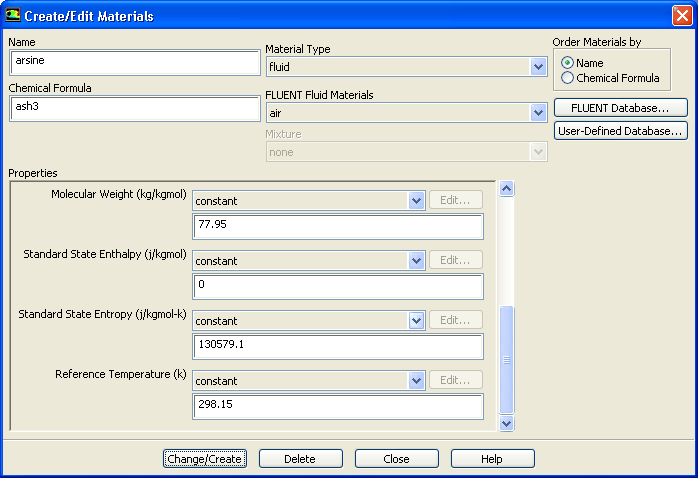
(a)   Enter arsine in the Name text entry field.

(b)   Enter ash3 in the Chemical Formula text entry field.

(c)   Specify the properties as shown in Table  16.1.


Table 16.1: Properties of arsine
Parameter Value
Cp kinetic-theory
Thermal Conductivity kinetic-theory
Viscosity kinetic-theory
Molecular Weight 77.95
Standard State Enthalpy 0
Standard State Entropy 130579.1
Reference Temperature 298.15

  Ignore the Density parameter as the density will be set to incompressible-ideal-gas for mixture.

Hint:   Scroll down in the Properties group box to see all the parameters.

(d)   Click Change/Create to create the new material.

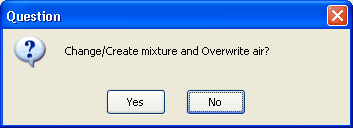
  A Question dialog box will open, asking if you want to overwrite air.

figure

(e)   Click No in the Question dialog box.

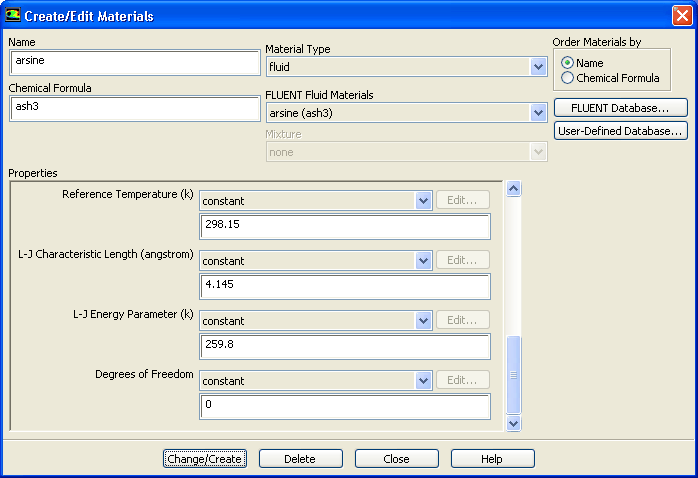
(f)   Select arsine(ash3) from the FLUENT Fluid Materials drop-down list.

   Properties group box will expand to show L-J Characteristic Length, L-J Energy Parameter, and Degrees of Freedom.

figure

(g)   Enter 4.145 for L-J Characteristic Length.

(h)   Enter 259.8 for L-J Energy Parameter.

(i)   Retain the default value of 0 for Degrees of Freedom.

(j)   Click Change/Create and close the Create/Edit Materials dialog box.

2.   Create other species following the same procedure as for AsH $_3$.

figure Materials figure figure air figure Create/Edit...

(a)   Enter the parameter values for each of the species as shown in Table  16.2.


Table 16.2: Properties of Species
Parameter Ga(CH_3)_3 CH_3 H_2 Ga_s As_s Ga As
Name tmg ch3g hydrogen ga_s as_s ga as
Chemical Formula ga<ch3>3 ch3 h2 ga_s as_s ga as
Cp kinetic-theory kinetic-theory kinetic-theory 520.64 520.64 1006.43 1006.43
Thermal Conductivity kinetic-theory kinetic-theory kinetic-theory 0.0158 0.0158 kinetic-theory kinetic-theory
Viscosity kinetic-theory kinetic-theory kinetic-theory 2.125 e-05 2.125 e-05 kinetic-theory kinetic-theory
Molecular Weight 114.83 15 2.02 69.72 74.92 69.72 74.92
Standard State Enthalpy 0 2.044 e+07 0 -3117.71 -3117.71 0 0
Standard State Entropy 130579.1 257367.6 130579.1 154719.3 154719.3 0 0
Reference Temperature 298.15 298.15 298.15 298.15 298.15 298.15 298.15
L-J Characteristic Length 5.68 3.758 2.827 - - 0 0
L-J Energy Parameter 398 148.6 59.7 - - 0 0
Degrees of Freedom 0 0 5 - - - -


(b)   Click Change/Create to create the new material.

(c)   Click No in the Question dialog box when asked if you want to overwrite air.

  To enter complex formulae such as Ga(CH $_{3}$) $_{3}$ in the text entry box, use ` $ < $' and ` $ > $' instead of ` (' and ` )', respectively.

3.   Set the mixture species.

figure Materials figure figure mixture-template figure Create/Edit...

(a)   Enter gaas_deposition for Name.

(b)   Click Change/Create.

(c)   Click Yes in the Question dialog box to overwrite the mixture-template.

(d)   Set the Selected Species, Selected Site Species, and Selected Solid Species.

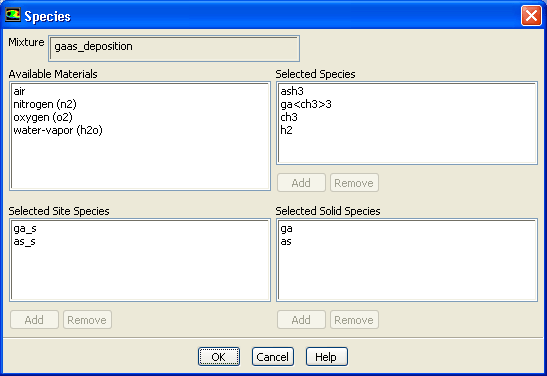
i.   Click the Edit... button to the right of the Mixture Species drop-down list to open the Species dialog box.

figure

ii.   Set the Selected Species, Selected Site Species, and Selected Solid Species from the Available Materials selection list as shown in Table  16.3.


Table 16.3: Selected Species
Selected Species Selected Site Species Selected Solid Species
ash3 ga_s ga
ga $<$ch3 $>$3 as_s as
ch3 - -
h2 - -

figure   

The species should appear in the same order as shown in Table  16.3. Ensure that h2 is at the bottom in the Selected Species selection list.

  To add/remove the species:

  • Select the required species from the Available Materials selection list and click Add in the corresponding species selection list ( Selected Species, Selected Site Species, or Selected Solid Species) to add a particular species to the list.

  • Select the species from the selection list (i.e., Selected Species, Selected Site Species, or Selected Solid Species) and click Remove in the corresponding selection list to remove an unwanted species from the selection list.

iii.   Click OK to close the Species dialog box after all the species are set under the respective categories.

(e)   Set the mixture reactions.

i.   Click the Edit... button to the right of the Reaction drop-down list to open the Reactions dialog box.

figure

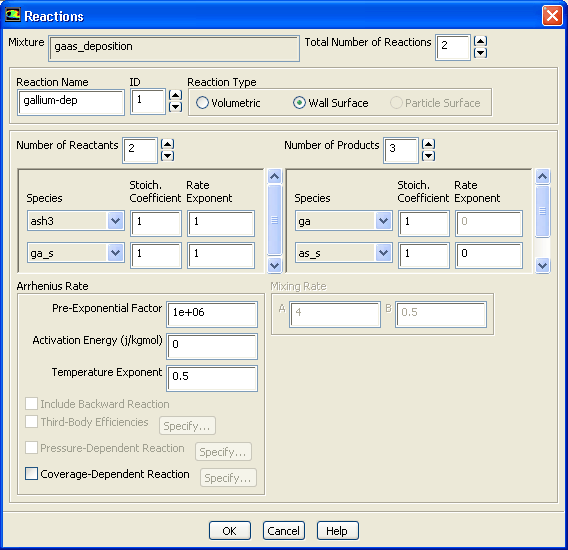
ii.   Increase the Total Number of Reactions to 2, and define the following reactions using the parameters in Table  16.4:


 AsH_3 + Ga\_s \rightarrow Ga + As\_s + 1.5H_2 (16.8-3)


 Ga(CH_3)_3 + As\_s \rightarrow As + Ga\_s + 3CH_3 (16.8-4)

   $CH_3$ further reacts with H ( $3CH_3 + 1.5H_2 \rightarrow 3CH_4$) on the substrate producing $CH_4$.


Table 16.4: Reaction Parameters
Parameter For Equation  16.3 For Equation  16.4
Reaction Name gallium-dep arsenic-dep
Reaction ID 1 2
Reaction Type Wall Surface Wall Surface
Number of Reactants 2 2
Species ash3, ga_s ga $<$ch3 $>$3, as_s
Stoich. Coefficient ash3= 1, ga_s= 1 ga $<$ch3 $>$3= 1, as_s= 1
Rate Exponent ash3= 1, ga_s= 1 ga $<$ch3 $>$3= 1, as_s= 1
Arrhenius Rate PEF= 1e+06, AE= 0, TE= 0.5 PEF= 1e+12, AE= 0, TE= 0.5
Number of Products 3 3
Species ga, as_s, h2 as, ga_s, ch3
Stoich. Coefficient ga= 1, as_s= 1, h2= 1.5 as= 1, ga_s= 1, ch3= 3
Rate Exponent as_s= 0, h2= 0 ga_s= 0, ch3= 0

Here,
PEF = Pre-Exponential Factor,
AE = Activation Energy, and
TE = Temperature Exponent.
  Set the ID to 2 in order to set the parameters for the second reaction.

iii.   Click OK to save the data and close the Reactions dialog box.

(f)   Set the reaction mechanisms for the mixture.
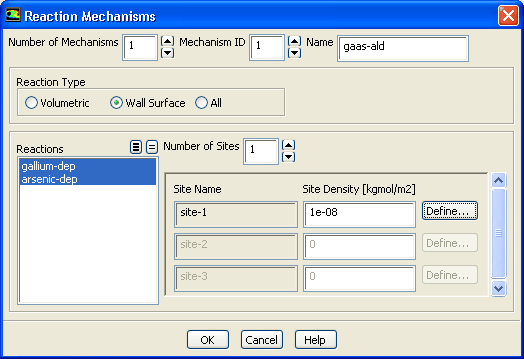
i.   Click the Edit... button to the right of the Mechanism drop-down list to open the Reaction Mechanisms dialog box.

figure

ii.   Retain Number of Mechanisms as 1.

iii.   Enter gaas-ald for Name.

iv.   Select Wall Surface in the Reaction Type group box.

v.   Select gallium-dep and arsenic-dep from the Reactions selection list.

vi.   Set Number of Sites to 1.

vii.   Enter 1e-08 kgmol/m $^2$ for Site Density for site-1.

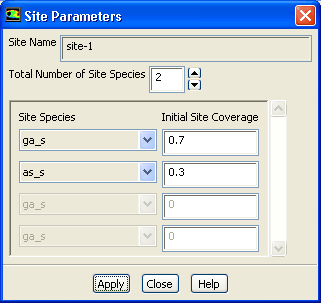
viii.   Click the Define... button to the right of site-1 to open the Site Parameters dialog box.

figure

a.   Set Total Number of Site Species to 2.

b.   Select ga_s as the first site species and enter 0.7 for Initial Site Coverage.

c.   Select as_s as the second site species and enter 0.3 for Initial Site Coverage.

d.   Click Apply and close the Site Parameters dialog box.

ix.   Click OK to close the Reaction Mechanisms dialog box.

(g)   Retain the default selection of incompressible-ideal-gas from the Density drop-down list.

(h)   Retain the default selection of mixing-law from the Cp drop-down list.

(i)   Select mass-weighted-mixing-law from the Thermal Conductivity drop-down list.

(j)   Select mass-weighted-mixing-law from the Viscosity drop-down list.

(k)   Select kinetic-theory from the Mass Diffusivity drop-down list.

(l)   Select kinetic-theory from the Thermal Diffusion Coefficient drop-down list.

(m)   Click Change/Create and close the Create/Edit Materials dialog box.


next up previous contents Previous: Step 3: Models
Up: Modeling Surface Chemistry
Next: Step 5: Boundary Conditions
Release 12.0 © ANSYS, Inc. 2009-02-09