Step 1: Mesh
1. Read in the mesh file
sector.msh
.
File
Read
Mesh...
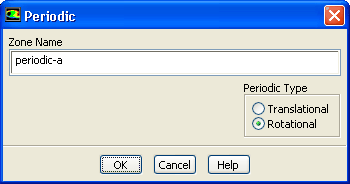
2. Change the periodic type of
periodic-a
to rotational.
Boundary Conditions
periodic-a
Edit...
(a) Select
Rotational
in the
Periodic Type
list.
(b) Click
OK
to close the
Periodic
dialog box.
3. In a similar manner, change the periodic type of
periodic-b
to rotational.
Previous:
Preparation
Up:
Modeling Evaporating Liquid Spray
Next:
Step 2: General Settings
Release 12.0 ©
ANSYS, Inc.
2009-02-09
![[ANSYS, Inc. Logo]](fluentlogo.gif)


 Read
Read
 Mesh...
 Boundary Conditions

 periodic-a
 Edit...
 Previous:
Preparation
Previous:
Preparation