[ANSYS, Inc. Logo] return to home search
next up previous contents

Step 3: Models

figure Models

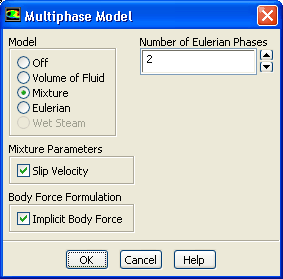
1.   Select the mixture multiphase model with slip velocities.

figure Models figure figure Multiphase figure Edit...

(a)   Select Mixture in the Model list.

  The Multiphase Model dialog box will expand to show the inputs for the mixture model.

figure

(b)   Ensure that Slip Velocity is enabled in the Mixture Parameters group box.

  You need to solve the slip velocity equation since there will be significant difference in velocities for the different phases.

(c)   Enable Implicit Body Force in the Body Force Formulation group box.

  This treatment improves solution convergence by accounting for the partial equilibrium of the pressure gradient and body forces in the momentum equations. It is used in VOF and mixture problems, where body forces are large in comparison to viscous and connective forces.

(d)   Click OK to close the Multiphase Model dialog box.

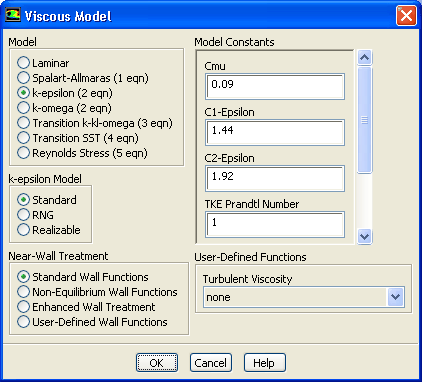
2.   Select the standard $k$- $\epsilon$ turbulence model with standard wall functions.

figure Models figure figure Viscous figure Edit...

figure

(a)   Select k-epsilon in the Model list.

(b)   Retain the default selection of Standard in the k-epsilon Model list.

  The standard $k$- $\epsilon$ model is quite effective in accurately resolving mixture problems when standard wall functions are used.

(c)   Retain the default selection of Standard Wall Functions in the Near-Wall Treatment list.

  This problem does not require a particularly fine mesh, and standard wall functions will be used.

(d)   Click OK to close the Viscous Model dialog box.


next up previous contents Previous: Step 2: General Settings
Up: Using the Mixture and
Next: Step 4: Materials
Release 12.0 © ANSYS, Inc. 2009-02-09