Reports

 Volume Integrals
 Set Up...
-
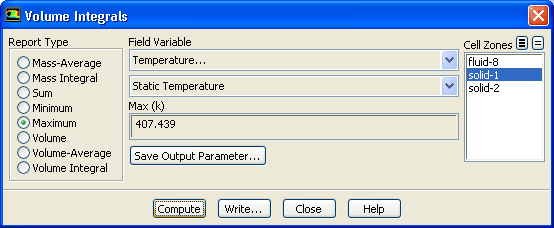
Reports of Volume Integral can be used to determine the Volume of a particular fluid region (i.e. fluid zone), the sum of quantities or the maximum and minimum values of particular variables. Here we will use the Volume Integral reports to determine the maximum and minimum temperature in the chip, board, and the airflow.
- 1.
Select
Maximum in the
Report Type group box.
- 2.
Select
Temperature... and
Static Temperature from the
Field Variable drop-down lists.
- 3.
Select
solid-1 from the
Cell Zones selection list.
- 4.
Click
Compute to calculate the maximum temperature.
-
The maximum temperature in the solid-1 cell zone (the chip) will be displayed.
- 5.
Select
Minimum in the
Report Type group box and click
Compute.
-
The minimum temperature will be displayed in the dialog box.
- 6.
Repeat the operations to determine the maximum and minimum temperatures in the
solid-2 and
fluid-8 cell zones, corresponding to the board and fluid volume, respectively.


 Previous:
Step 14: Saving Hardcopy
Previous:
Step 14: Saving Hardcopy
Up:
Postprocessing
Next:
Summary
Release 12.0 © ANSYS, Inc. 2009-02-09 ![[ANSYS, Inc. Logo]](fluentlogo.gif)