![[ANSYS, Inc. Logo]](fluentlogo.gif)


|
|
|
When using an implicit-in-time solution algorithm (dual-time stepping), and depending on the physical time step size and the most important time scales in the flow, you can write the acoustic source data at every time step. You can also coarsen it in time by a given frequency factor. The highest possible frequency the acoustic analysis can generate is based on the time step size of the collected acoustic source data.
When using the density-based explicit solver, the physical time step must be computed by the solver, based on the CFL condition (Courant number). Due to the possibly large fluctuations of the physical time step, an adapting time-stepping procedure can be used when the FW-H acoustics model is enabled. This allows you to use a user-specified time interval for sampling the acoustic data. In turn, the solver adapts its time step, when necessary, without violating the CFL conditions to make sure that data is available at the desired time interval (hence, avoiding data interpolations).
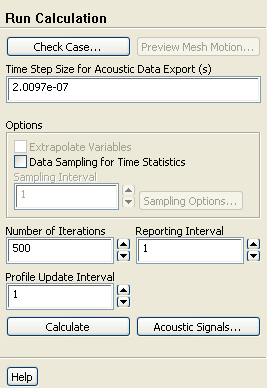
In the Run Calculation task page (Figure 22.2.8), enter the Time Step Size for Acoustic Data Export to specify the time interval for acoustic data sampling. The value of this constant time step size determines the highest frequency that the acoustic analysis reproduces.
You can refer to Section 26.12 for more information about the Run Calculation task page.
 Run Calculation
You can now proceed to instruct ANSYS FLUENT to perform a transient calculation for a suitable number of time steps. When the calculation is finished, you will have either the source data saved on files (if you chose to save it to a file or files), or the sound pressure signals (if you chose to perform an acoustic calculation "on the fly''), or both (if you chose to save the source data to files and if you chose to perform the acoustic calculation "on the fly'').
If you chose to save the source data to files, the ANSYS FLUENT console window will print a message at the end of each time step indicating that source data have been written (or appended to) a file (e.g., acoustic_example240.asd).
Previous:
22.2.3 Specifying Acoustic Receivers