![[ANSYS, Inc. Logo]](fluentlogo.gif)


|
|
|
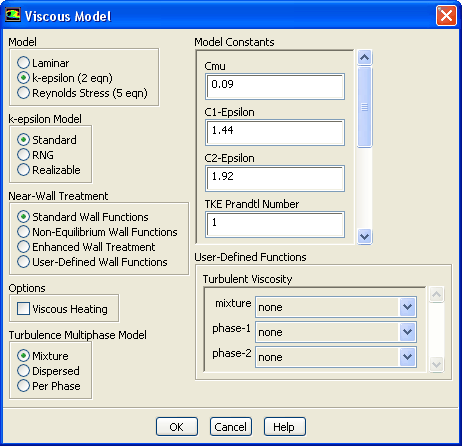
If you are using the Eulerian model to solve a turbulent flow, you will need to choose one of turbulence models described in this section in the separate Theory Guide in the Viscous Model dialog box (Figure 24.5.3).
The procedure is as follows:
 -
-
 turbulence model for each phase. This model is appropriate when the turbulence transfer among the phases plays a dominant role.
You can enable the effect of drift velocity by performing the following:
define
 models
 viscous
 multiphase-turbulence
 multiphase-options
/define/models/viscous/multiphase-turbulence> multiphase-options Enable dispersion force in momentum? [no] yes Enable interphase turbulence source? [no] yes |
The effect of the drift velocity is influenced both by the momentum equation and, to a lesser extent, the turbulence equation. Therefore, you should answer yes to both questions to take into account the effect of drift velocity.
|
|
Anisotropic drag applicable to free surface modeling is only compatible with the
Mixture turbulence model.
|
Including Source Terms
By default, the interphase momentum,
 , and
, and
 sources are not included in the calculation. If you want to include any of these source terms, you can enable them using the
multiphase-options command in the
define/models/viscous/multiphase-turbulence/ text menu. Note that the inclusion of these terms can slow down convergence noticeably. If you are looking for additional accuracy, you may want to compute a solution first without these sources, and then continue the calculation with these terms included. In most cases these terms can be neglected.
sources are not included in the calculation. If you want to include any of these source terms, you can enable them using the
multiphase-options command in the
define/models/viscous/multiphase-turbulence/ text menu. Note that the inclusion of these terms can slow down convergence noticeably. If you are looking for additional accuracy, you may want to compute a solution first without these sources, and then continue the calculation with these terms included. In most cases these terms can be neglected.
Customizing the
 -
-
 Multiphase Turbulent Viscosity
If you are using the
 -
-
 multiphase turbulence model, a user-defined function can be used to customize the turbulent viscosity for each phase. This option will enable you to modify
 in the
 -
-
 model. For more information, see the separate
UDF Manual. In the
Viscous Model dialog box, under
User-Defined Functions, select the appropriate user-defined function in the
Turbulent Viscosity drop-down list.
model. For more information, see the separate
UDF Manual. In the
Viscous Model dialog box, under
User-Defined Functions, select the appropriate user-defined function in the
Turbulent Viscosity drop-down list.
Previous:
24.5.3 Setting Time-Dependent Parameters