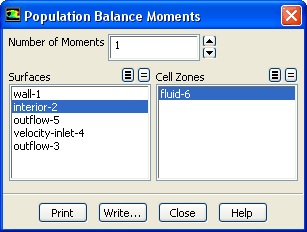
You can compute moments for the population balance model using the
Population Balance Moments dialog box (Figure
4.2.1).
ReportPopulation BalanceMoments...
Figure 4.2.1: The
Population Balance Moments Dialog Box
The steps for computing moments are as follows:
1.
For the discrete method, specify the
Number of Moments. For the SMM and QMOM, the number of moments is set equal to the number of moments that were solved, and thus cannot be changed.
2.
For a surface average, select the surface(s) on which to calculate the moments in the
Surfaces list.
3.
For a volume average, select the volume(s) in which to calculate the moments in the
Cell Zones list.
4.
Click
Print to display the moment values in the console window.
5.
To save the moment calculations to a file, click
Write... and enter the appropriate information in the resulting
Select File dialog box. The file extension should be
.pb.
![[ANSYS, Inc. Logo]](fluentlogo.gif)


 Population Balance
 Moments...