In this step, you will modify the default setting for the mixture by enabling the gas law. By default, the mixture material uses constant properties. Retain this constant property assumption for now, allowing only the mixture density to vary with temperature and composition. The influence of variable property inputs on the combustion prediction will be examined in a later part of the tutorial.
1.
Revise the properties for the mixture materials.
MaterialsMixtureCreate/Edit...
The
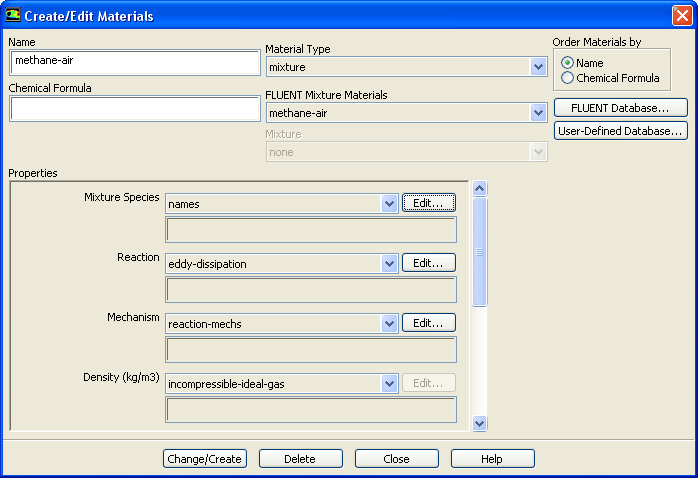
Create/Edit Materials dialog box will display the mixture material (
methane-air) that was selected in the
Species Model dialog box. The properties for this mixture material have been copied from the
ANSYS FLUENT database and will be modified in the following steps.
(a)
Click the
Edit... button to the right of the
Mixture Species drop-down list to open the
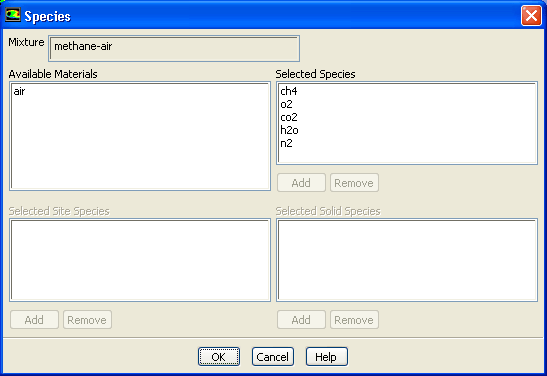
Species dialog box.
You can add or remove species from the mixture material as necessary using the
Species dialog box.
i.
Retain the default selections from the
Selected Species selection list.
The species that make up the methane-air mixture are predefined and require no modification.
ii.
Click
OK to close the
Species dialog box.
(b)
Click the
Edit... button to the right of
the
Reaction drop-down list to open the
Reactions dialog box.
The eddy-dissipation reaction model ignores chemical kinetics (i.e., the Arrhenius rate) and uses only the parameters in the
Mixing Rate group box in the
Reactions dialog box. The
Arrhenius Rate group box will therefore be inactive. The values for
Rate Exponent and
Arrhenius Rate parameters are included in the database and are employed when the alternate finite-rate/eddy-dissipation model is used.
i.
Retain the default values in the
Mixing Rate group box.
ii.
Click
OK to close the
Reactions dialog box.
(c)
Retain the selection of
incompressible-ideal-gas from the
Density drop-down list.
(d)
Select
constant from the
Cp drop-down list and enter
1000 for the specific heat value.
Scroll down to find the
Cp drop-down list and number-entry box.
(e)
Click
Change/Create to accept the material property settings.
(f)
Close the
Create/Edit Materials dialog box.
The initial calculation will be performed assuming that all properties except density are constant. The use of constant transport properties (viscosity, thermal conductivity, and mass diffusivity coefficients) is acceptable because the flow is fully turbulent. The molecular transport properties will play a minor role compared to turbulent transport. The assumption of constant specific heat, however, has a strong effect on the combustion solution. You will change this property definition in Step 7: Solution with Varying Heat Capacity.
![[ANSYS, Inc. Logo]](fluentlogo.gif)


 Materials
 Materials

 Mixture
 Create/Edit...

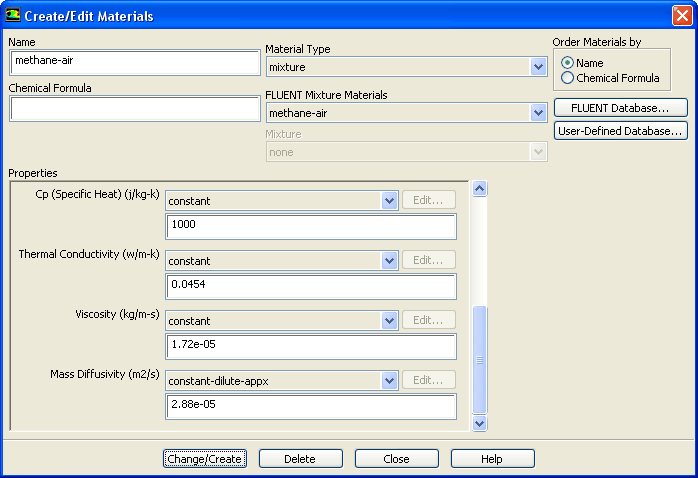
 for the specific heat value.