- 1.
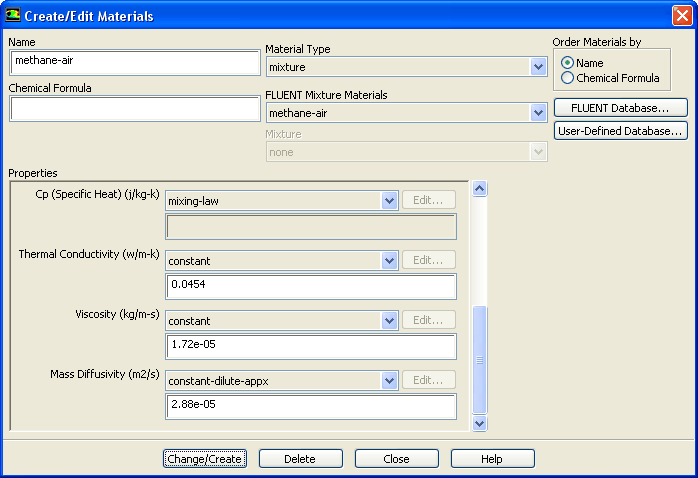
Enable composition dependence of the specific heat.
 Materials

 Mixture
 Create/Edit...
- (a)
Select
mixing-law from the
Cp drop-down list in the
Properties group box.
-
Scroll up the list to find
mixing-law.
- (b)
Click
Change/Create.
-
The specific heat of the mixture will now be based on a local mass-fraction-weighted average of all the species.
- (c)
Close the
Create/Edit Materials dialog box.
- 2.
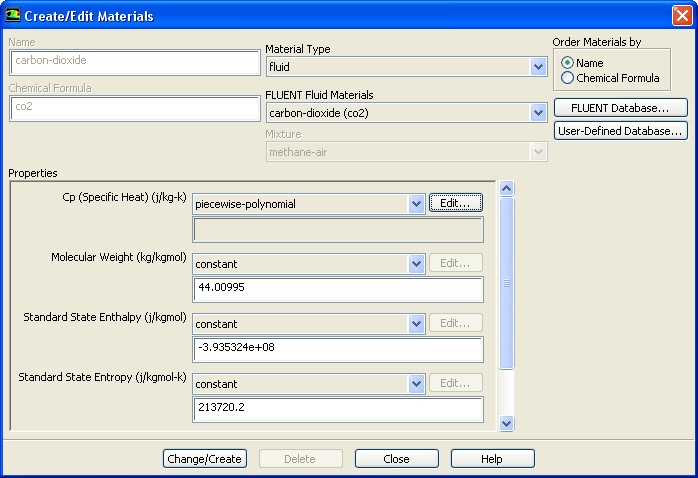
Enable temperature dependence of the specific heat for CO
 .
.
 Materials

 carbon-dioxide
 Create/Edit...
- (a)
Ensure that
piecewise-polynomial is selected from the
Cp drop-down list in the
Properties group box.
- (b)
Click the
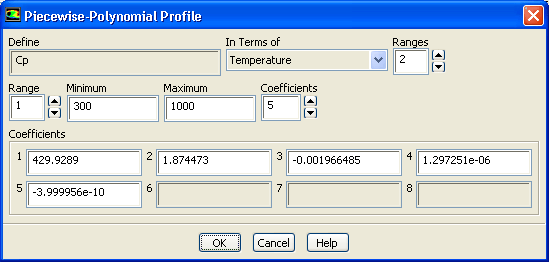
Edit... button to open the
Piecewise-Polynomial Profile dialog box.
- i.
Retain the default values in the
Coefficients group box.
-
The default coefficients describe the polynomial
 and are extracted from the
ANSYS FLUENT property database.
and are extracted from the
ANSYS FLUENT property database.
- ii.
Click
OK to close the
Piecewise-Polynomial Profile dialog box.
- (c)
Close the
Create/Edit Materials dialog box.
- 3.
Similarly, ensure that temperature dependence of specific heat is enabled for the remaining species (CH
 , N
, N
 , O
, O
 , and H
 O).
O).
- 4.
Request 500 more iterations.
 Run Calculation
-
The residuals will jump significantly as the solution adjusts to the new specific heat representation. The solution will converge after approximately 235 additional iterations.
- 5.
Save the new case and data files (
gascomb2.cas.gz and
gascomb2.dat.gz).
File
 Write
Write
 Case & Data...
![[ANSYS, Inc. Logo]](fluentlogo.gif)