Step 6: Operating Conditions
Boundary Conditions
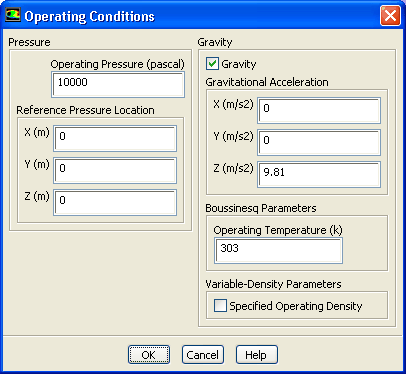
1. Specify the operating conditions.
Boundary Conditions
Operating Conditions...
(a) Enter
10000
Pa for
Operating Pressure
.
(b) Enable
Gravity
.
(c) Enter
9.81
for
Gravitational Acceleration
in the
Z
direction.
(d) Enter
303
K for
Operating Temperature
.
(e) Click
OK
to close the
Operating Conditions
dialog box.
The
Operating Conditions
dialog box can be accessed from the
Cell Zone Conditions
task page as well as the
Boundary Conditions
task page.
Previous:
Step 5: Boundary Conditions
Up:
Modeling Surface Chemistry
Next:
Step 7: Non-Reacting Flow
Release 12.0 ©
ANSYS, Inc.
2009-02-09
![[ANSYS, Inc. Logo]](fluentlogo.gif)


 Boundary Conditions
 Boundary Conditions
 Operating Conditions...
 for
Gravitational Acceleration in the
Z direction.
Previous:
Step 5: Boundary Conditions
for
Gravitational Acceleration in the
Z direction.
Previous:
Step 5: Boundary Conditions