[ANSYS, Inc. Logo] return to home search
next up previous contents

Step 7: Non-Reacting Flow Solution

1.   Disable Volumetric for solving non-reacting flow.

figure Models figure figure Species figure Edit...

(a)   Disable Volumetric in the Reactions group box.

(b)   Click OK to close the Species Model dialog box.

  You will be running a non-reacting solution to establish the flow.

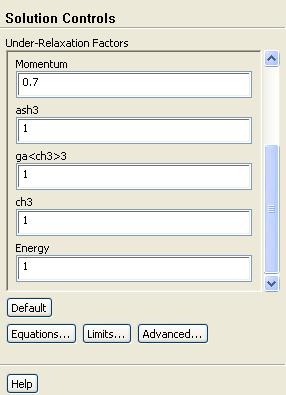
2.   Retain the default Under-Relaxation Factors.

figure Solution Controls

figure

3.   Enable residual plotting during the calculation.

figure Monitors figure figure Residuals figure Edit...

(a)   Retain the default settings and close the Residual Monitors dialog box.

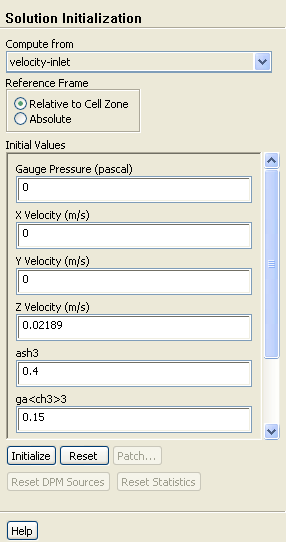
4.   Initialize the flow field using the boundary conditions set at velocity-inlet.

figure Solution Initialization

figure

(a)   Select velocity-inlet from the Compute from drop-down list.

(b)   Click Initialize

5.   Save the case file ( surface-non-react.cas.gz).

File $\rightarrow$ Write $\rightarrow$ Case...

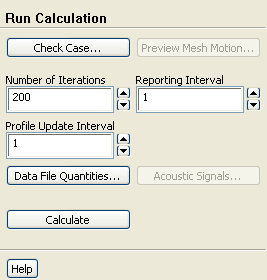
6.   Start the calculation by requesting 200 iterations.

figure Run Calculation

figure

(a)   Enter 200 for Number of Iterations and click Calculate.

  The solution will converge in approximately 120 iterations.


next up previous contents Previous: Step 6: Operating Conditions
Up: Modeling Surface Chemistry
Next: Step 8: Reacting Flow
Release 12.0 © ANSYS, Inc. 2009-02-09