Step 3: Models
Models
1. Enable the
Volume of Fluid
multiphase model.
Models
Multiphase
Edit...
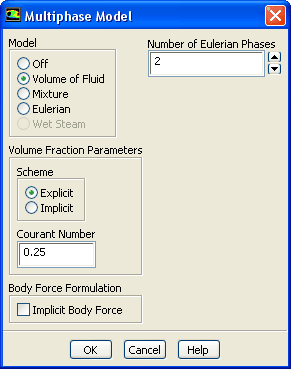
(a) Select
Volume of Fluid
from the
Model
list.
The
Multiphase Model
dialog box will expand.
(b) Retain the default settings and click
OK
to close the
Multiphase Model
dialog box.
Previous:
Step 2: General Settings
Up:
Using the VOF Model
Next:
Step 4: Materials
Release 12.1 ©
ANSYS, Inc.
2009-09-09
![[ANSYS, Inc. Logo]](fluentlogo.gif)


 Models
 Models

 Multiphase
 Edit...
 Previous:
Step 2: General Settings
Previous:
Step 2: General Settings