The default properties of air and water defined in
ANSYS FLUENT are suitable for this problem. In this step, you will make sure that both materials are available for selection in later steps.
1.
Add water to the list of fluid materials by copying it from the
ANSYS FLUENT materials database.
MaterialsairCreate/Edit...
(a)
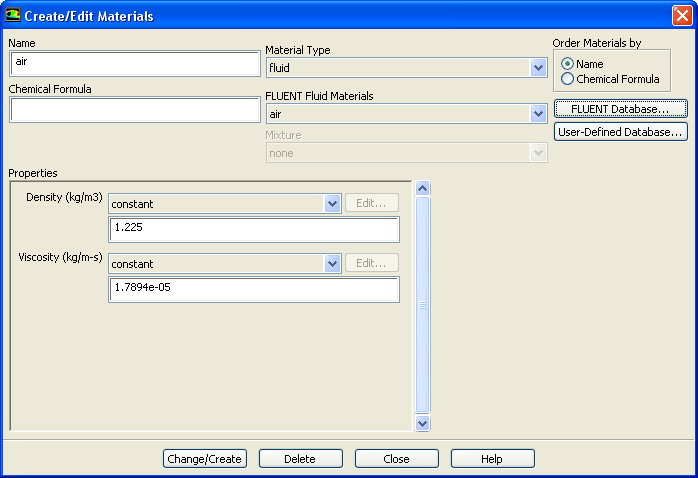
Click
FLUENT Database... in the
Create/Edit Materials dialog box to open the
FLUENT Database Materials dialog box.
i.
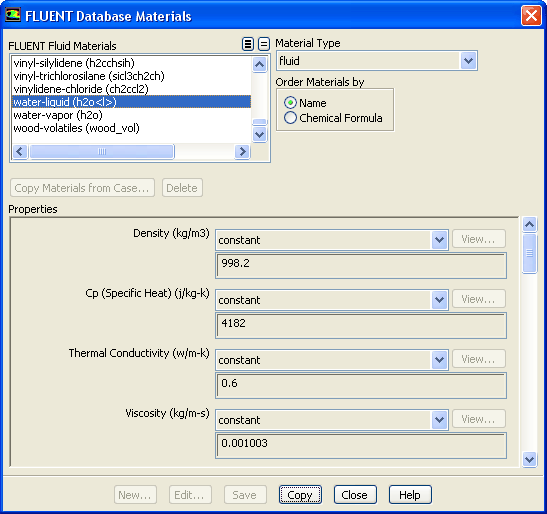
Select
water-liquid (h2o
l
) from the
FLUENT Fluid Materials selection list.
Scroll down the
FLUENT Fluid Materials list to locate
water-liquid (h2o
l
).
ii.
Click
Copy to copy the information for water to your list of fluid materials.
iii.
Close the
FLUENT Database Materials dialog box.
(b)
Click
Change/Create and close the
Create/Edit Materials dialog box.
![[ANSYS, Inc. Logo]](fluentlogo.gif)


 Materials
 Materials

 air
air
 Create/Edit...
 l
l
 ) from the
FLUENT Fluid Materials selection list.
) from the
FLUENT Fluid Materials selection list.
 l
l
 ).
).