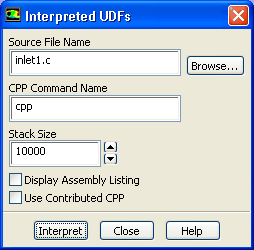
1.
Interpret the UDF source file for the ink velocity distribution (
inlet1.c).
DefineUser-DefinedFunctionsInterpreted...
(a)
Enter
inlet1.c for
Source File Name.
If the UDF source file is not in your working folder, then you must enter the entire folder path for
Source File Name instead of just entering the file name. Alternatively, click the
Browse... button and select
inlet1.c in the
vof folder that was created after you unzipped the original file.
(b)
Click
Interpret.
The UDF defined in
inlet1.c will now be visible and available for selection as
udf membrane_speed in the drop-down lists of relevant graphical user interface dialog boxes.
![[ANSYS, Inc. Logo]](fluentlogo.gif)


 User-Defined
 Functions
 Interpreted...