[ANSYS, Inc. Logo] return to home search
next up previous contents

Step 4: Materials

figure Materials

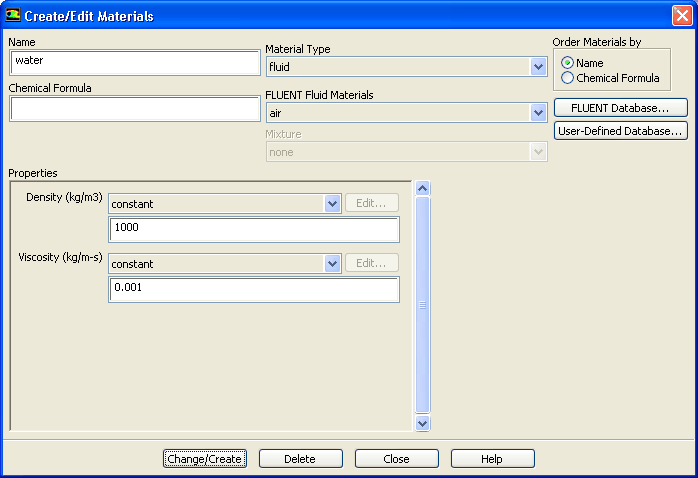
1.   Create a new material to be used for the primary phase.

figure Materials figure figure Fluid figure Create/Edit...

figure

(a)   Enter water for Name.

(b)   Enter 1000 ${\rm kg/m}^{3}$ for Density.

(c)   Enter 0.001 ${\rm kg/m-s}$ for Viscosity.

(d)   Click Change/Create.

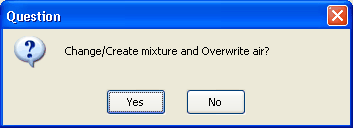
  A Question dialog box will open, asking if you want to overwrite air. Click Yes.

figure

2.   Copy water vapor from the materials database and modify its properties.

figure Materials figure figure Fluid figure Create/Edit...

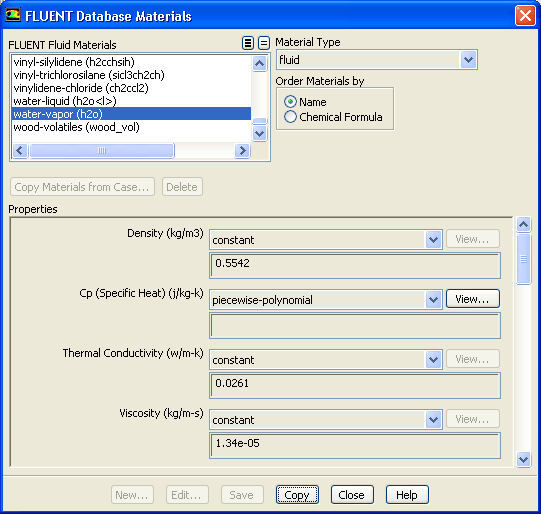
(a)   Click the FLUENT Database... button to open the FLUENT Database Materials dialog box.

figure

i.   Select water-vapor (h2o) from the FLUENT Fluid Materials selection list.

  Scroll down the list to find water-vapor (h2o).

ii.   Click Copy to include water vapor in your model.

iii.   Close the FLUENT Database Materials dialog box.

figure

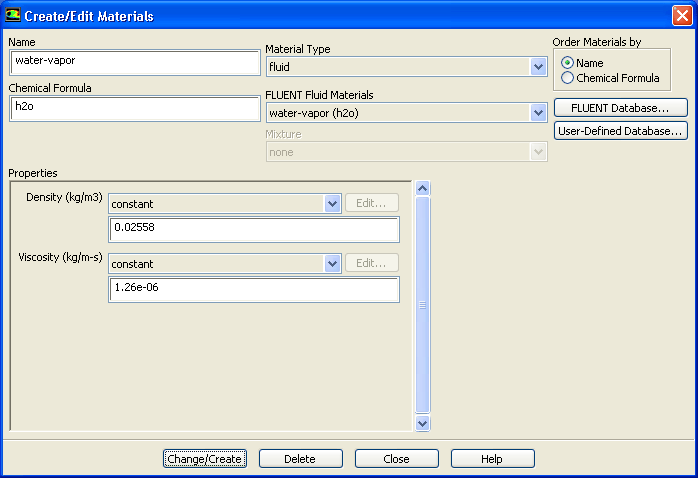
(b)   Enter 0.02558 ${\rm kg/m}^{3}$ for Density.

(c)   Enter 1.26e-06 ${\rm kg/m-s}$ for Viscosity.

(d)   Click Change/Create and close the Create/Edit Materials dialog box.


next up previous contents Previous: Step 3: Models
Up: Modeling Cavitation
Next: Step 5: Phases
Release 12.0 © ANSYS, Inc. 2009-02-09