Step 7: Operating Conditions
Boundary Conditions
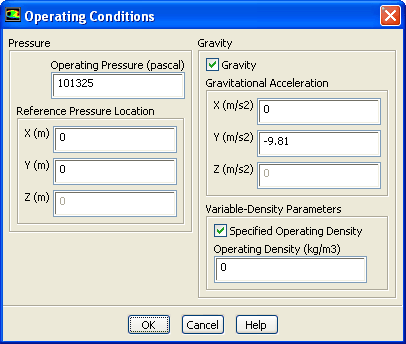
1. Set the gravitational acceleration.
Boundary Conditions
Operating Conditions...
(a) Enable
Gravity
.
The
Operating Conditions
dialog box will expand to show additional inputs.
(b) Enter
-9.81
for
Y
in the
Gravitational Acceleration
group box.
(c) Enable
Specified Operating Density
.
(d) Enter
0
for
Operating Density
.
(e) Click
OK
to close the
Operating Conditions
dialog box.
Previous:
Step 6: Boundary Conditions
Up:
Using the Mixture and
Next:
Step 8: Solution Using
Release 12.0 ©
ANSYS, Inc.
2009-02-09
![[ANSYS, Inc. Logo]](fluentlogo.gif)


 Boundary Conditions
 Boundary Conditions
 Operating Conditions...
 for
Y in the
Gravitational Acceleration group box.
for
Y in the
Gravitational Acceleration group box.
 for
Operating Density.
Previous:
Step 6: Boundary Conditions
for
Operating Density.
Previous:
Step 6: Boundary Conditions