[ANSYS, Inc. Logo] return to home search
next up previous contents

Step 8: Solution Using the Mixture Model

1.   Set the solution parameters.

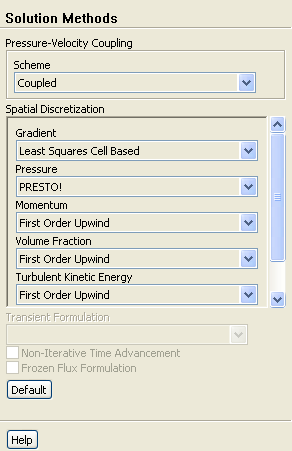
figure Solution Methods

figure

(a)   Select Coupled from the Scheme drop-down list.

(b)   Select PRESTO! from the Pressure drop-down list.

2.   Set the solution controls.

figure Solution Controls

(a)   Enter 40 for Courant Number.

(b)   Enter 0.5 for both Momentum and Pressure in the Explicit Relaxation Factors group box.

figure

(c)   Enter 0.4 for both Slip Velocity and Volume Fraction in the Under-Relaxation Factors group box.

3.   Enable the plotting of residuals during the calculation.

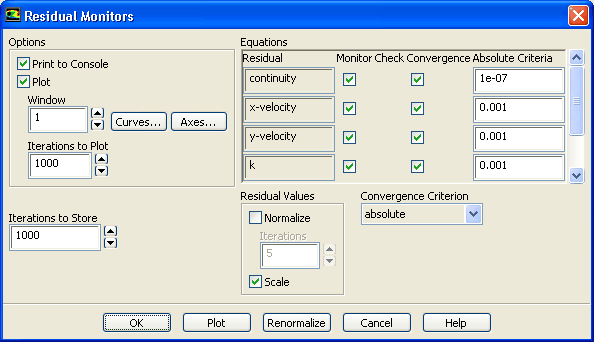
figure Monitors figure figure Residuals figure Edit...

figure

(a)   Ensure that Plot is enabled in the Options group box.

(b)   Enter 1e-07 for Absolute Criteria for continuity.

(c)   Click OK to close the Residual Monitors dialog box.

4.   Initialize the solution.

figure Solution Initialization

figure

(a)   Enter 0.001 ${\rm m^2/s^2}$ for Turbulent Kinetic Energy.

(b)   Click Initialize.

5.   Save the case file ( tee.cas.gz).

File $\rightarrow$ Write $\rightarrow$ Case...

6.   Start the calculation by requesting 400 iterations.

figure Run Calculation

7.   Save the case and data files ( tee.cas.gz and tee.dat.gz).

File $\rightarrow$ Write $\rightarrow$ Case & Data...

8.   Check the total mass flow rate for each phase.

figure Reports figure figure Fluxes figure Set Up...

figure

(a)   Retain the default selection of Mass Flow Rate in the Options list.

(b)   Select water from the Phase drop-down list.

(c)   Select outflow-3, outflow-5, and velocity-inlet-4 from the Boundaries selection list.

(d)   Click Compute.

  Note that the net mass flow rate is almost zero, indicating that total mass is conserved.

(e)   Select air from the Phase drop-down list and click Compute again.

  Note that the net mass flow rate is almost zero, indicating that total mass is conserved.

(f)   Close the Flux Reports dialog box.


next up previous contents Previous: Step 7: Operating Conditions
Up: Using the Mixture and
Next: Step 9: Postprocessing for
Release 12.0 © ANSYS, Inc. 2009-02-09