- 1.
Select the Eulerian multiphase model.
 Models

 Multiphase
 Edit...
- (a)
Select
Eulerian in the
Model list.
- (b)
Click
OK to close the
Multiphase Model dialog box.
- 2.
Specify the drag law to be used for computing the interphase momentum transfer.
 Phases
 Interaction...
- (a)
Retain the default selection of
schiller-naumann from the
Drag Coefficient drop-down list.
- (b)
Click
OK to close the
Phase Interaction dialog box.
-
Note:
For this problem, there are no parameters to be set for the individual phases other than those that you specified when you set up the phases for the mixture model calculation. If you use the Eulerian model for a flow involving a granular secondary phase, you will need to set additional parameters. There are also other options in the
Phase Interaction dialog box that may be relevant for other applications.
For details on setting up an Eulerian multiphase calculation, see
this section in the separate
User's Guide.
- 3.
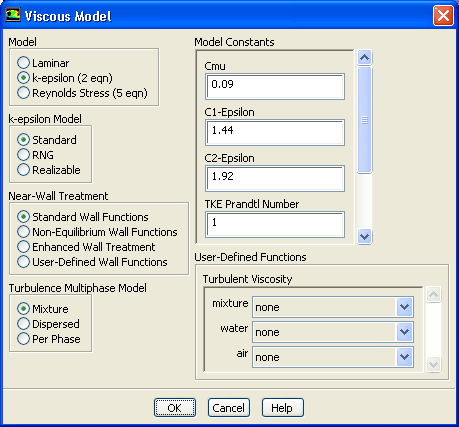
Select the multiphase turbulence model.
 Models

 Viscous
 Edit...
- (a)
Retain the default selection of
Mixture in the
Turbulence Multiphase Model list.
- (b)
Click
OK to close the
Viscous Model dialog box.
-
The mixture turbulence model is applicable when phases separate, for stratified (or nearly stratified) multiphase flows, and when the density ratio between phases is close to 1. In these cases, using mixture properties and mixture velocities is sufficient to capture important features of the turbulent flow.
For more information on turbulence models for the Eulerian multiphase model, see
this chapter in the separate
User's Guide.
- 4.
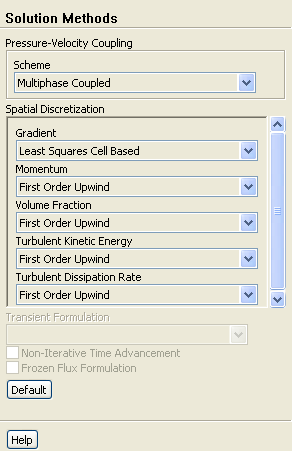
Change the solution parameters.
 Solution Methods
- (a)
Select
Multiphase Coupled from the
Scheme drop-down list.
- 5.
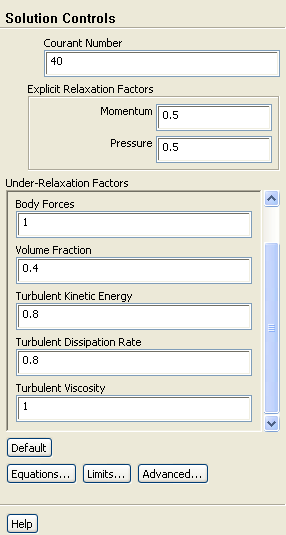
Change the solution controls.
 Solution Controls
- (a)
Enter
40 for
Courant Number.
- (b)
Enter
0.5 for both
Momentum and
Pressure in the
Explicit Relaxation Factors group box.
- (c)
Retain the value of
0.4 for
Volume Fraction in the
Under-Relaxation Factors group box.
- 6.
Continue the solution by requesting 1200 additional iterations.
 Run Calculation
- 7.
Save the case and data files (
tee2.cas.gz and
tee2.dat.gz).
File
 Write
Write
 Case & Data...
![[ANSYS, Inc. Logo]](fluentlogo.gif)