In this step, you will add liquid water to the list of fluid materials by copying it from the
ANSYS FLUENT materials database and create a new material called sand.
1.
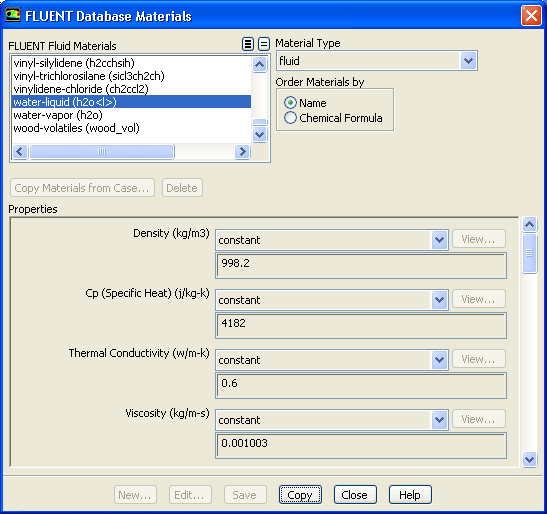
Copy liquid water from the
ANSYS FLUENT materials database so that it can be used for the primary phase.
MaterialsFluidCreate/Edit...
(a)
Click the
FLUENT Database... button to open the
FLUENT Database Materials dialog box.
(b)
Select
water-liquid (h2o
l
) from the
FLUENT Fluid Materials selection list.
Scroll down the
FLUENT Fluid Materials list to locate
water-liquid (h2o
l
).
(c)
Click
Copy to copy the information for liquid water to your model.
(d)
Close the
FLUENT Database Materials dialog box.
2.
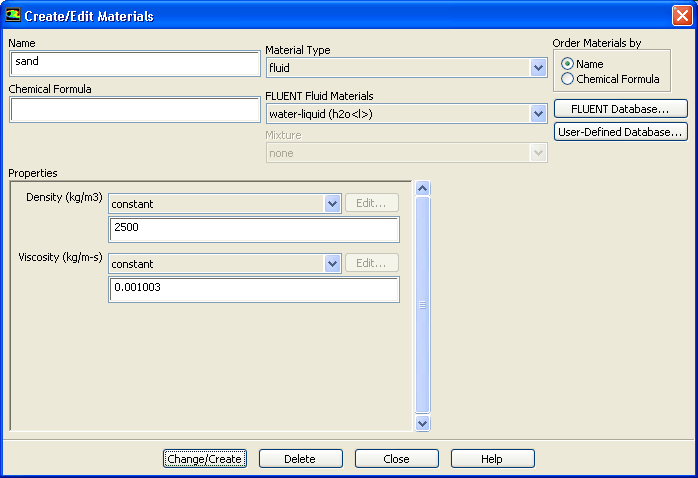
Create a new material called
sand.
(a)
Enter
sand for
Name and delete the entry in the
Chemical Formula field.
(b)
Enter
2500 kg/m
for
Density in the
Properties group box.
(c)
Click
Change/Create.
A
Question dialog box will open, asking if you want to overwrite
water-liquid.
(d)
Click
No in the
Question dialog box to retain
water-liquid and add the new material (
sand) to the list.
The
Create/Edit Materials dialog box will be updated to show the new material,
sand, in the
FLUENT Fluid Materials drop-down list.
![[ANSYS, Inc. Logo]](fluentlogo.gif)


 Materials
 Materials

 Fluid
Fluid
 Create/Edit...
 l
l
 ) from the
FLUENT Fluid Materials selection list.
) from the
FLUENT Fluid Materials selection list.
 l
l
 ).
). 
 for
Density in the
Properties group box.
for
Density in the
Properties group box.