[ANSYS, Inc. Logo] return to home search
next up previous contents

Step 7: Cell Zone Conditions

figure Cell Zone Conditions

figure

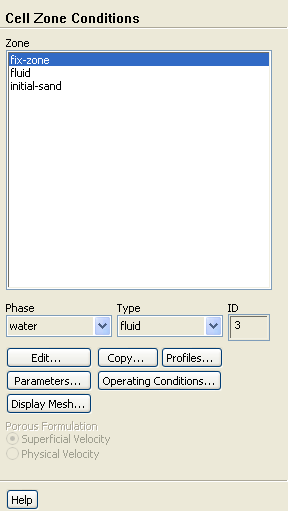
  For this problem, you do not have to specify any conditions for outer boundaries. Within the domain, there are three fluid zones, representing the impeller region, the region where the sand is initially located, and the rest of the tank. There are no conditions to be specified in the latter two zones, so you need to set conditions only in the zone representing the impeller.

1.   Set the boundary conditions for the fluid zone representing the impeller ( fix-zone) for the primary phase.

figure Cell Zone Conditions figure figure fix-zone

  You will specify the conditions for water and sand separately using the UDF. The default conditions for the mixture (i.e., conditions that apply to all phases) are acceptable.

(a)   Select water from the Phase drop-down list.

(b)   Click the Edit... button to open the Fluid dialog box.

figure

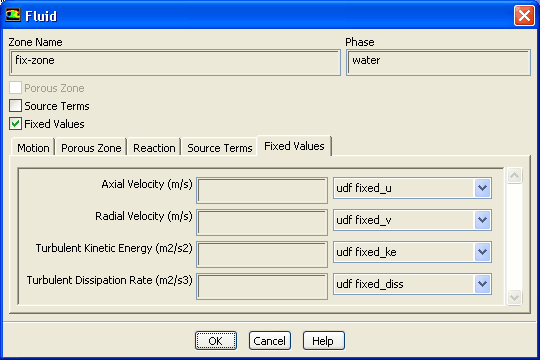
i.   Enable Fixed Values.

  The Fluid dialog box will expand to show the related inputs.

ii.   Click the Fixed Values tab and set the following fixed values:


Parameter Value
Axial Velocity udf fixed_u
Radial Velocity udf fixed_v
Turbulence Kinetic Energy udf fixed_ke
Turbulence Dissipation Rate udf fixed_diss

(c)   Click OK to close the Fluid dialog box.

2.   Set the boundary conditions for the fluid zone representing the impeller ( fix-zone) for the secondary phase.

figure Cell Zone Conditions figure figure fix-zone

(a)   Select sand from the Phase drop-down list.

(b)   Click the Edit... button to open the Fluid dialog box.

figure

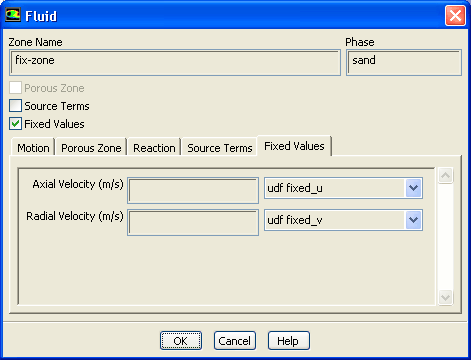
i.   Enable Fixed Values.

  The Fluid dialog box will expand to show the related inputs.

ii.   Click the Fixed Values tab and set the following fixed values:


Parameter Value
Axial Velocity udf fixed_u
Radial Velocity udf fixed_v

(c)   Click OK to close the Fluid dialog box.


next up previous contents Previous: Step 6: User-Defined Function
Up: Using the Eulerian Multiphase
Next: Step 8: Solution
Release 12.0 © ANSYS, Inc. 2009-02-09