[ANSYS, Inc. Logo] return to home search
next up previous contents

Step 4: Materials

figure Materials

  In this step, you will create a new material and specify its properties, including the melting heat, solidus temperature, and liquidus temperature.

1.   Define a new material.

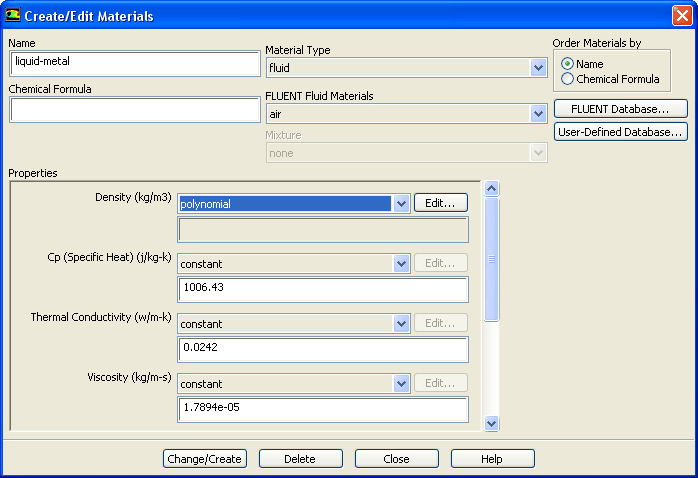
figure Materials figure figure Fluid figure Create/Edit...

figure

(a)   Enter liquid-metal for Name.

(b)   Select polynomial from the Density drop-down list to open the Polynomial Profile dialog box.

  Scroll down the list to find polynomial.

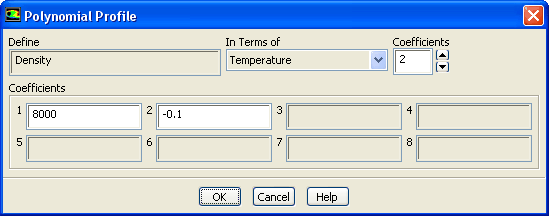
figure

i.   Set Coefficients to 2.

ii.   Enter 8000 for 1 and -0.1 for 2 in the Coefficients group box.

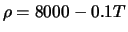
  As shown in Figure  22.1, the density of the material is defined by a polynomial function: $\rho = 8000 - 0.1T$.

iii.   Click OK to close the Polynomial Profile dialog box.

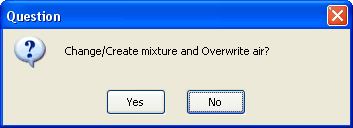
  A Question dialog box will open, asking you if air should be overwritten. Click No to retain air and add the new material ( liquid-metal) to the FLUENT Fluid Materials drop-down list.

figure

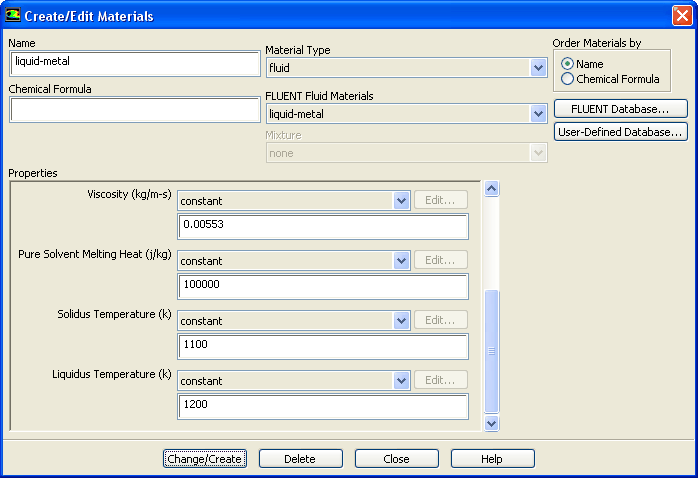
(c)   Select liquid-metal from the FLUENT Fluid Materials drop-down list to set the other material properties.

figure

(d)   Enter 680 ${\rm j/kg-k}$ for Cp.

(e)   Enter 30 ${\rm w/m-k}$ for Thermal Conductivity.

(f)   Enter 0.00553 ${\rm kg/m-s}$ for Viscosity.

(g)   Enter 100000 ${\rm j/kg}$ for Pure Solvent Melting Heat.

  Scroll down the group box to find Pure Solvent Melting Heat and the properties that follow.

(h)   Enter 1100 ${\rm K}$ for Solidus Temperature.

(i)   Enter 1200 ${\rm K}$ for Liquidus Temperature.

(j)   Click Change/Create and close the Create/Edit Materials dialog box.


next up previous contents Previous: Step 3: Models
Up: Modeling Solidification
Next: Step 5: Cell Zone
Release 12.0 © ANSYS, Inc. 2009-02-09