Step 3: Models
Models
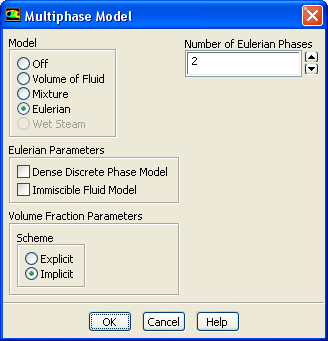
1. Enable the Eulerian multiphase model for two phases.
Models
Multiphase
Edit...
(a) Select
Eulerian
from the
Model
list.
(b) Click
OK
to close the
Multiphase Model
dialog box.
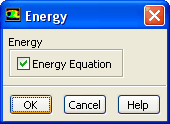
2. Enable heat transfer by enabling the energy equation.
Models
Energy
Edit...
(a) Enable
Energy Equation
.
(b) Click
OK
to close the
Energy
dialog box.
An
Information
dialog box will open. Click
OK
to close the
Information
dialog box.
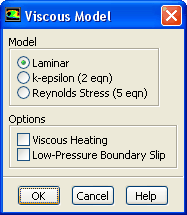
3. Retain the default laminar viscous model.
Models
Viscous
Edit...
Experiments have shown negligible three-dimensional effects in the flow field for the case modeled, suggesting very weak turbulent behavior.
Previous:
Step 2: General Settings
Up:
Using the Eulerian Granular
Next:
Step 4: UDF
Release 12.0 ©
ANSYS, Inc.
2009-02-09
![[ANSYS, Inc. Logo]](fluentlogo.gif)


 Models
 Models

 Multiphase
 Edit...
 Models

 Energy
 Edit...
 Models

 Viscous
 Edit...
 Previous:
Step 2: General Settings
Previous:
Step 2: General Settings