1.
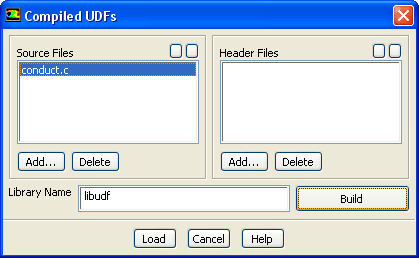
Compile the user-defined function,
conduct.c, that will be used to define the thermal conductivity for the gas and solid phase.
DefineUser-DefinedFunctionsCompiled...
(a)
Click the
Add... button below the
Source Files option to open the
Select File dialog box.
i.
Select the file
conduct.c and click
OK in the
Select File dialog box.
(b)
Click
Build.
ANSYS FLUENT will create a
libudf folder and compile the UDF. Also, a
Warning dialog box will open asking you to make sure that UDF source file and case/data files are in the same folder.
(c)
Click
OK to close the
Warning dialog box.
(d)
Click
Load to load the UDF.
Extra:
If you decide to read in the case file that is provided for this tutorial on the User Services Center, you will need to compile the UDF associated with this tutorial in your working folder. This is necessary because
ANSYS FLUENT will expect to find the correct UDF libraries in your working folder when reading the case file.
![[ANSYS, Inc. Logo]](fluentlogo.gif)


 User-Defined
 Functions
 Compiled...