Step 5: Materials
Materials
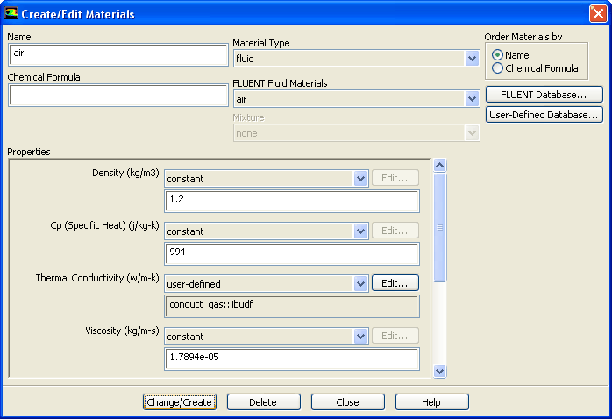
1. Modify the properties for air, which will be used for the primary phase.
Materials
air
Create/Edit...
The properties used for air are modified to match data used by Kuipers et al. [1]
(a) Enter
1.2
kg/m
for
Density
.
(b) Enter
994
J/kg-K for
Cp
.
(c) Select
user-defined
from the
Thermal Conductivity
drop-down list to open the
User Defined Functions
dialog box.
i. Select
conduct_gas::libudf
from the available list.
ii. Click
OK
to close the
User Defined Functions
dialog box.
(d) Click
Change/Create
.
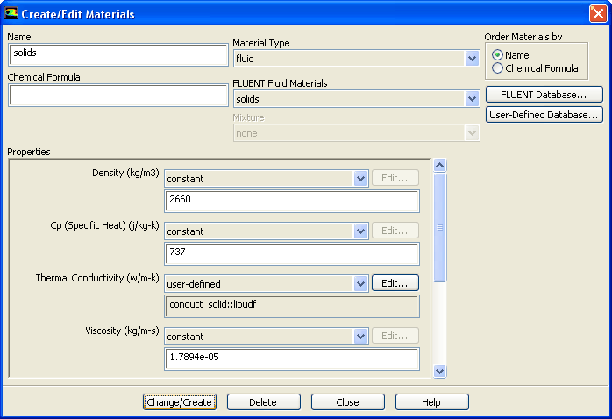
2. Define a new fluid material for the granular phase (the glass beads).
Materials
air
Create/Edit...
(a) Enter
solids
for
Name
.
(b) Enter
2660
kg/m
for
Density
.
(c) Enter
737
J/kg-K for
Cp
.
(d) Retain the selection of
user-defined
from the
Thermal Conductivity
drop-down list.
(e) Click the
Edit...
button to open the
User Defined Functions
dialog box.
i. Select
conduct_solid::libudf
in the
User Defined Functions
dialog box and click
OK
.
A
Question
dialog box will open asking if you want to overwrite
air
.
ii. Click
No
in the
Question
dialog box.
(f) Select
solids
from the
FLUENT Fluid Materials
drop-down list.
(g) Click
Change/Create
and close the
Materials
dialog box.
Previous:
Step 4: UDF
Up:
Using the Eulerian Granular
Next:
Step 6: Phases
Release 12.0 ©
ANSYS, Inc.
2009-02-09
![[ANSYS, Inc. Logo]](fluentlogo.gif)


 Materials
 Materials

 air
air
 Create/Edit...
 for
Density.
for
Density.
 Materials

 air
air
 Create/Edit...
 for
Density.
Previous:
Step 4: UDF
for
Density.
Previous:
Step 4: UDF