[ANSYS, Inc. Logo] return to home search
next up previous contents

3.3.2 Defining Population Balance Boundary Conditions

To define boundary conditions specific to the population balance model, use the following procedure:

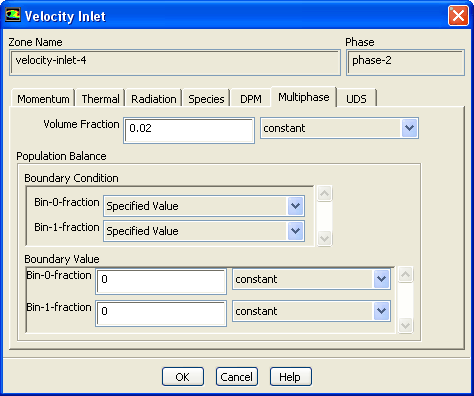
1.   In the Boundary Conditions task page, select the secondary phase(s) in the Phase drop-down list and then open the appropriate boundary condition dialog box (e.g., Figure  3.3.8).

figure Boundary Conditions

Figure 3.3.8: Specifying Inlet Boundary Conditions for the Population Balance Model
figure

2.   In the Multiphase tab, under Boundary Condition, select the type of boundary condition for each bin (for the discrete method) or moment (for SMM and QMOM) as either Specified Value or Specified Flux.

Note that the boundary condition variables (e.g., Bin-0) are labeled according to the following:

bin/moment - $i$th bin/moment

where the $i$th bin/moment can range from 0 (the first bin or moment) to $N-1$, where $N$ is the number of bins/moments that you entered in the Population Balance Model dialog box.

3.   Under Population Balance Boundary Value, enter a value or a flux as appropriate.

  • If you selected Specified Value for the selected boundary variable, enter a value in the field adjacent to the variable name. This value will correspond to the variable $f_i$ in Equation  2.3-4 (for the discrete method) or $m_k$ in Equation  2.3-19 (for SMM or QMOM).

  • If you selected Specified Flux for the selected boundary variable, enter a value in the field adjacent to the variable name. This value will be the spatial particle volume flux $dV/dx_i$.


next up previous contents Previous: 3.3.1 Enabling the Population
Up: 3.3 Population Balance Model
Next: 3.3.3 Specifying Population Balance
Release 12.0 © ANSYS, Inc. 2009-01-12